
一款可分享密码的解压缩 app 分析学习
解压专家 (apk)
依据 ELF 结构
分析一款可以共享密码的解压缩 app,其中用到了 native 的知识点
本文将介绍两种 native 解密方法
java 层
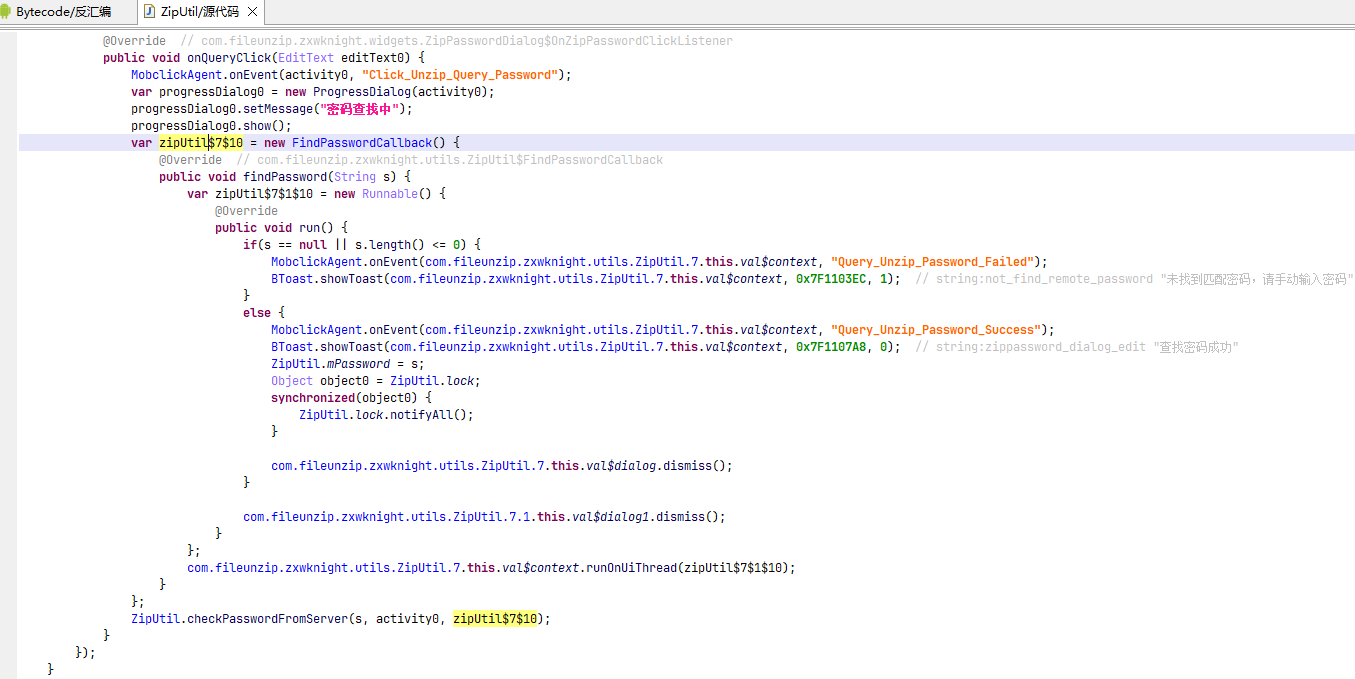
1 | |
getVersionName
1 | |

User-Client-Access
1 | |
其中 getQPWAT 调用 libZMCoreUnZip.so 的 executeGBS native 方法
1 | |
native 层
静态分析+vibe
发现能识别 elf,但是 export 符号很奇怪,不是可见字符,且指示条不正常
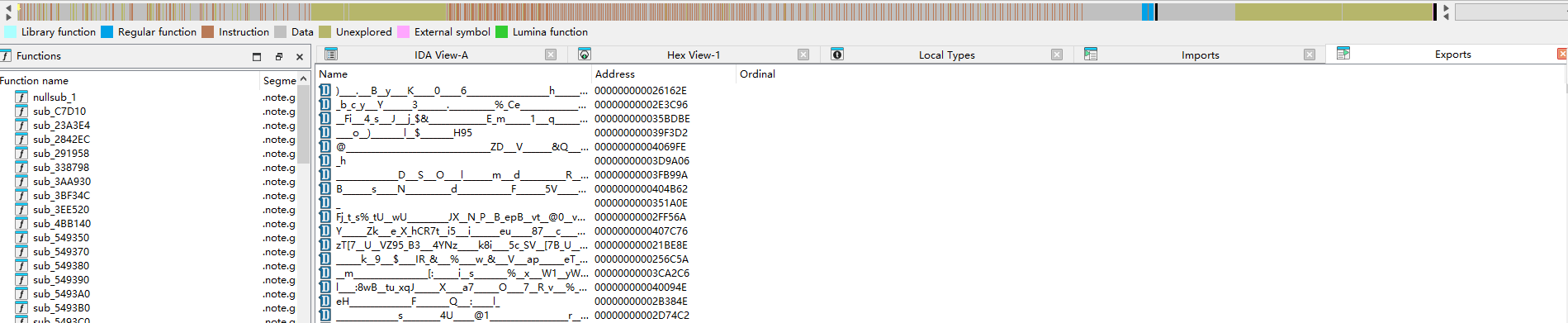
发现 JNI_OnLoad export 不存在,所以看 init_array
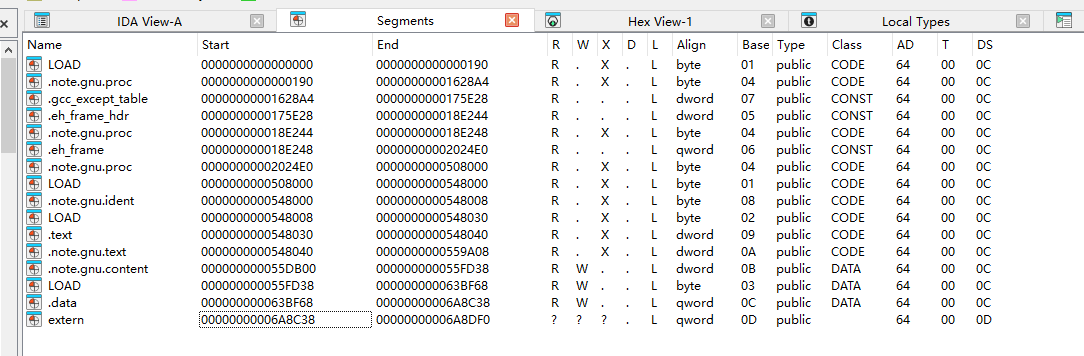
发现不是很好找,这里根据 elf 结构我们可以直接根据 Elf64_Dyn 类型引用定位到 ELF Dynamic Information 然后找到 DT_INIT_ARRAY
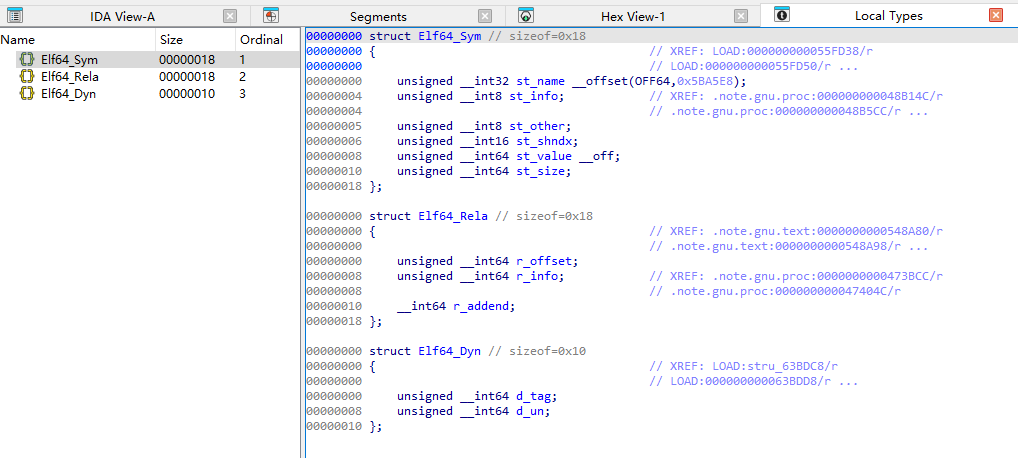
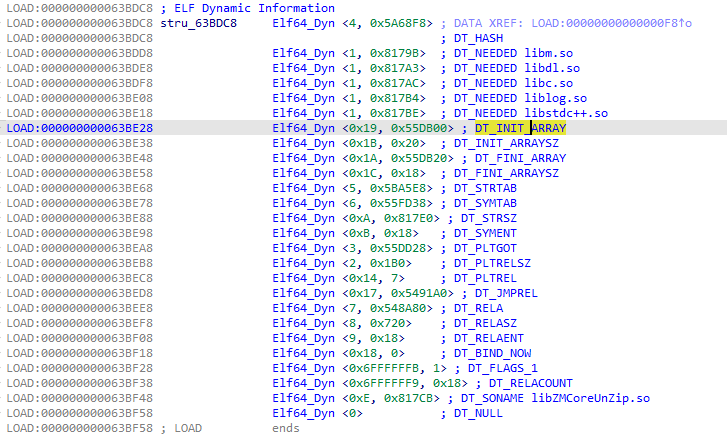
随后发现 init_array 均为空值 0,说明需要重定向。
查看 DT_RELA 元素为 Elf64_Rela
1 | |
注意我们需要 r_info == 0x403 的项目,且 r_offset 需要位于 [DT_INIT_ARRAY, DT_INIT_ARRAY + DT_INIT_ARRAYSZ) 之中,即 [0x55DB00, 0x55DB00+0x20)
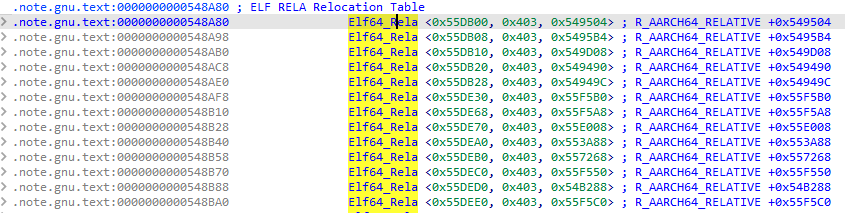
所以 init_array 为
1 | |
可以通过编写以下脚本来应用重定向
1 | |
借助 ai 分析,能够找到关键全局变量并创建结构体
1 | |
1 | |
三个 init 函数分别有以下功能
init1 负责环境探测
| 顺序 | 动作 | 结果 |
|---|---|---|
| 1 | dlopen("libc.so") |
获得 libc 句柄 |
| 2 | dlsym("__system_property_get") |
获得系统属性读取函数 |
| 3 | 读取 ro.build.version.sdk |
记录 Android SDK 版本 |
| 4 | 打开 /proc/self/maps |
枚举当前进程映射 |
| 5 | 按 "%lx-%lx %4s %*x %*x:%*x %*d%n" 解析映射行 |
获得区间和页权限 |
| 6 | 结合 SDK、模块位置和权限写入全局状态 | 给 init3 与 load2_load_packed_segments 使用 |
init2 负责恢复 dynsym、dynstr
1 | |
注意到:
| item | value |
|---|---|
DT_SYMTAB |
0x55FD38 |
DT_STRTAB |
0x5BA5E8 |
DT_STRSZ |
0x817E0 |
DT_HASH.nchain |
0x2F28 |
loader_meta.sym_index_begin |
0x3A |
loader_meta.sym_index_end |
0x2F28 |
loader_meta.dynsym_seed3 |
0x815C0 |
dynstr_dynsym_decode_Impl 的解密过程
dynstr_dynsym_decode_Impl @ 0x54D6B8 做两件事:先解 .dynstr,再修 .dynsym
1 | |
给出修复脚本
1 | |
init3 负责还原代码
1 | |
load2_load_packed_segments
函数概括为六个阶段:
- 从 ELF header 后定位主 packed payload,并定位 payload 尾部的 trailer
- 根据
flags获取可选字符串或构造外部 key - 第一次调用
core_decode,恢复 metadata 后方的 ELF 链接信息块 - 以链接信息块为基址回填 Program Header、
.dynsym、.dynamic和 relocation 地址 - 第二次调用
core_decode,把主 packed payload 还原为带 8 字节长度头的 zlib 包 - 分配独立输出缓冲,调用
zlib_uncompress2_wrapper,再按PT_LOAD解释解压结果
flowchart TD
    A["从 image_base 定位 packed_src"]
    B["准备 packed_dst 与 ext_key"]
    C["解码 `meta+0x48` 数据块"]
    D{"flags"}
    E["bit5: fixed XOR"]
    F["bit1: core_decode"]
    G["读取 unpacked_size / compressed_size"]
    H["解压为最终 ELF 内存镜像"]
    I["回填 elf_parse_ctx_t"]
    A --> B --> C --> D
    D --> E --> G
    D --> F --> G
    D -->|无解码标志| G
G --> H --> IRuntimeMalloc、RuntimeFree、RuntimeMemcpy 等名称对应 API 表里的 libc 函数;AcquireFlag4String/AcquireFlag8String/AcquireFlag10String 只是按控制它们的 flag 命名,具体业务语义仍未确认。
1 | |
该样本将会执行两次 core_decode 而不执行 xor_decode_fixed_key_blocks
| 调用点 | 输入范围 | 解密内容 | 解密后的用途 |
|---|---|---|---|
0x54CB7C |
0x63C020 开始,长度 0x6CC18 |
壳放在 loader_meta 后方的 ELF 链接信息块 |
结果保存到 ctx+0x90;后续以它为基址计算 .dynsym、.dynamic、RELA、JMPREL 和 Android relocation 地址 |
0x54CFE8 |
image_base+0x190 开始,长度 0x5062E0 |
主 packed payload,即压缩的最终代码/数据镜像外层 | 结果前 8 字节给出解压长度,packed_dst+8 再送入解压函数生成最终内存镜像 |
core_decode 伪代码
1 | |
zlib_uncompress2_wrapper
sub_557170 @ 0x557170 是壳内置 zlib 的一次性解压包装器,参数语义与 uncompress2() 基本一致:
1 | |
解压后需要按 PT_LOAD 分段映射
zlib 解压后的 main_payload 输出长度为 0x530268
以下 Elf64_Phdr 来自于第一次 core_decode 解出的 metadata 开头
metadata 开头连续保存 6 个 Elf64_Phdr;筛选 p_type == PT_LOAD 后得到:
p_offset |
p_vaddr |
p_filesz |
p_memsz |
|---|---|---|---|
0x0 |
0x0 |
0x5062E0 |
0x5062E0 |
0x5062E0 |
0x50A2E0 |
0x29CF0 |
0x29D20 |
0x52FFD0 |
0x537FD0 |
0x298 |
0xBAE0 |
完整运行时映射为:
1 | |
第二段的 p_memsz - p_filesz = 0x30,第三段为 0xB848;这两块段尾内存必须清零。
当前 IDB 的 VA 0..0x18F 已经保存原始 ELF header 和 Program Header Table,为了避免静态 patch 时覆盖这些结构,可以仅对首段执行:
1 | |
解密脚本
1 | |
unidbg
编写 test 脚本
1 | |
将原来的前 0x190 字节复制到 dump 的即可分析
其他
其实还应该解密 elf 最后的 .data 段用于实现 GOT、LPT 定位的,但是比较麻烦就先不做了(分配到动态内存中了),而上述静态分析方法可以直接解密(或者这里结合一下静态的脚本解密一下也可以),下面给出一个工具脚本,用于 patch GOT,当然不使用也可以
1 | |
分析 executeGBS
1 | |
伪代码
1 | |
POC
1 | |
Wechat 开启 H5 DevTools
环境:Android 微信 8.0.69
目标:让chrome://inspect能看到并调试微信内打开的 H5 网页 (真实 DOM / Console / Network / 断点), 不包括小程序
背景
微信有两套浏览器内核
微信打开网页不是用一个固定的浏览器,而是在 XWeb 框架下可选多个内核。本文只关心两个:
Pinus 内核(默认)
Pinus 是腾讯基于 Chromium 自研裁剪的浏览器内核(源码路径里叫 weblayer,基于 Chrome 116),
以 libxwebcore.so(135MB)的形式打包在微信里,类名 com.tencent.xweb.pinus.sdk.WebView,
内核类型枚举值 WV_KIND_PINUS
它的调试不走标准通道:Pinus 不开标准的 webview_devtools_remote 调试端口,而是走微信
自己的私有远程调试(往 xweb.weixin.qq.com 拨 WebSocket 隧道),chrome 连不上
系统 WebView 内核
就是 Android 系统自带的 WebView(本机是 libmonochrome_64.so,171MB,Chrome 130),
内核类型 WV_KIND_SYS。它是标准 Chromium,开启调试后会 bind 标准的webview_devtools_remote_<pid> 端口,chrome://inspect 直接就能连
开启 webview 调试为什么无法连接上
调用 android.webkit.WebView.setWebContentsDebuggingEnabled(true) 想开调试但因为渲染页面的是 Pinus,开调试端口的却是系统 WebView。所以 chrome://inspect 里能看到”远程浏览器”,却没有可点的 page。
1 | |
一、系统 WebView 内核方案
1. 做法总览
强制微信用系统 WebView 渲染 H5 + 开启系统 WebView 调试。 setWebContentsDebuggingEnabled(true) 只对 系统 WebView 那套生效
2. 选择内核
1 | |
2.1 枚举 f1
1 | |
2.2 WebView.H0 — 决策入口
1 | |
代码里直接读出三点:
- 只决策一次:
WebView.m != NONE就直接返回。WebView.m由I0(initWebviewCore)→J0在第一个 WebView 创建时写一次(WebView.m = f10),之后全进程复用 —— 运行时改WebView.m或刷页面没用,旧 WebView 早用 Pinus 建好了。 - HardCode 优先级最高:
t0.a.c(module)返回非 NONE 就直接采用,根本不读服务器setwebtype。 - CW / PINUS 兜底成 SYS:落 else 分支
WebView.p=true。我们写WV_KIND_SYS不触发兜底,稳走 SYS。
2.3 u0.c — 读 HardCodeWebView
1 | |
2.4 z3.f — 打开 xweb_debug
1 | |
串起来:往 xweb_debug 写 HardCodeWebViewmm = WV_KIND_SYS → u0.c("mm") 返回 SYS → H0 采用、返回 SYS → I0/J0 写进 WebView.m → 系统内核渲染、标准调试端口有页面。
3. 落地代码
1 | |
4. 注入哪个进程、具体怎么做
核心前提:hookDevTools 只要保证 WebView.H0 在首次点开 H5 网页之前被 hook 住即可。
注入进程:UI 进程 com.tencent.mm(无后缀)。它是最终渲染 H5、H0 选择内核的进程。
完整流程:
1 | |
二、Pinus 内核自己的私有调试(存档)
「不切系统内核、直接在 Pinus 上调试」的可行性分析
结论:技术可行,但要自己搭中转 + 破触发锁,投入产出比低
基于libxwebcore.so(Chrome116)逆向
6. Pinus 调试是「往外拨」,不是「等你连」
系统 WebView 是开个本地端口等 chrome 来连(server 模型)。Pinus 相反 —— 它是客户端,
主动拨号连微信服务器,把 CDP 流量通过 WebSocket 隧道转出去:
1 | |
设备隧道命令(XWebDevTools_OnTunnelData):XWeb.targets / XWeb.version /XWeb.inspect / XWeb.close / XWeb.NetLog*。CDP 会话本身是完整原生的,只是被套进
隧道发去了微信服务器。
7. 帧格式与地址(静态读出)
帧格式:XWebWebSocketAdapter::Write(0x270A3D4)拿一段裸字节直接塞进 WebSocket,
无自定义封包,就是「JSON 文本 over WebSocket」:
- 设备隧道:收
{"method":"XWeb.inspect","params":{...}},发{"event":"...","data":{...}} - 目标隧道:收发就是裸 CDP JSON(
{"id":1,"method":"Runtime.evaluate",...}及其 response),
进出点sub_270CF24(server→CDP)/sub_3627EEC(CDP→server)
三个地址全写死 host = xweb.weixin.qq.com,只有 id/token 是变量:api/rd/create_device、rd/device/%s、rd/target/%s?token=%s。
8. 触发被三重锁死(私有化的真正门槛)
想让 Pinus 自己发起,入口是页面 JS window.xweb_remote_debug.RemoteDebugStart(token),但:
- JS 注册域名锁:
RemoteDebugStart只在页面域名 =xweb.weixin.qq.com时才挂到window.xweb_remote_debug(sub_2715ABC)。普通 H5 页面只有RemoteDebugStatus/Stop。 - 二次域名校验:
HandleRemoteDebugStart(0x2716500)里又查一遍,非该域名返回invalid domain。 - 需要 token + renderer 线程:token 来自微信调试门户,
create_device也要联微信服务器。
9. 私有化路线(若非做不可)
- spawn 时(页面加载前)hook
std::string == "xweb.weixin.qq.com"(0x26D8860,窄化到只对
该域名返回真)绕过两处域名锁。 - hook
XWeb_RD_CreateDevice(0x2711A18)、XWebTarget_StartClientProxy(0x270D194),把xweb.weixin.qq.com改写成ws://localhost:<port>。 - 本地中转扮演三个角色:
create_device(返 deviceId)+ 设备隧道(下发XWeb.inspect{targetId, deviceToken},targetId 从XWeb.targets返回里拿)+ 目标隧道
(裸 CDP 双向桥给 chrome 前端)。 - 注入帧要打进真正渲染内容的 render frame,不是 appbrand 的
about:blank容器帧。
实测尝试运行时抓帧,卡在:触发锁 + 多进程漂移(H5 落 :appbrand0)+ 注入到空容器帧。
比板块一重得多,除非必须用 Pinus 内核渲染又要调试,否则不建议。
附:关键符号
| 符号 | 作用 |
|---|---|
com.tencent.xweb.f1 |
内核类型枚举 (WV_KIND_*) |
com.tencent.xweb.WebView.H0(f1, String) |
内核决策入口 (getPreferedWebviewType) |
com.tencent.xweb.WebView.m |
缓存已决策内核的静态字段 |
com.tencent.xweb.u0.c(String) |
从 xweb_debug SP 读 HardCodeWebView |
br5.z3.f() |
打开 SharedPreferences “xweb_debug” |
com.tencent.xweb.pinus.sdk.WebView |
Pinus 内核 WebView |
Native 模块:
| 模块 | 说明 |
|---|---|
libxwebcore.so |
Pinus 内核 (Chrome 116),渲染页面 |
libmonochrome_64.so |
系统 WebView (Chrome 130),标准调试端口 |
socket webview_devtools_remote_<pid> |
系统 WebView 的调试端口 |
libxwebcore.so Pinus 私有调试函数(libxwebcore.so.i64):
| RVA | 名字 | 作用 |
|---|---|---|
0x2715658 |
XWebFrameHelper_CreateXWebExtend |
注入 window.xweb_remote_debug |
0x2715ABC |
(AddRemoteDebugMethods) | 注册 JS 方法;RemoteDebugStart 有域名锁 |
0x2716500 |
(HandleRemoteDebugStart) | Start 处理,二次域名校验 + 取 token |
0x2711A18 |
XWeb_RD_CreateDevice |
注册设备,硬编码 create_device URL |
0x2711F64 |
(device tunnel WS) | 开设备隧道 rd/device |
0x270EB0C |
XWebDevTools_OnTunnelData |
设备隧道命令分发 |
0x270D194 |
XWebTarget_StartClientProxy |
开目标隧道,硬编码 rd/target URL |
0x270CF24 |
(target onMessage) | 目标隧道 server→CDP 入口 |
0x3627EEC |
(session dispatch) | CDP→server 出口 |
0x270A3D4 |
XWebWebSocketAdapter::Write |
裸字节写 WS(无自定义封包) |
0x26D8860 |
std::string::operator==(char*) |
域名锁字符串比较(绕过点) |
0x3615C5C |
XWeb_GetTabHostById |
按 targetId 查真实 DevToolsAgentHost |
提取
libxwebcore.so:解split_delivery.config.arm64_v8a.apk→ 取libxwebfullpack.so
(是个 zip)→ 再解出libxwebcore.so。
提取libmonochrome_64.so:从com.google.android.trichromelibrary_*的base.apk
取lib/arm64-v8a/libmonochrome_64.so。
2026 腾讯游戏安全 PC 初赛 WP
驱动加载
使用 EfiGuard 进行 PG 和 DSE 修复
1 | |
绿字进系统后关闭 DSE 就可以加载驱动了
1 | |
启动驱动后运行程序
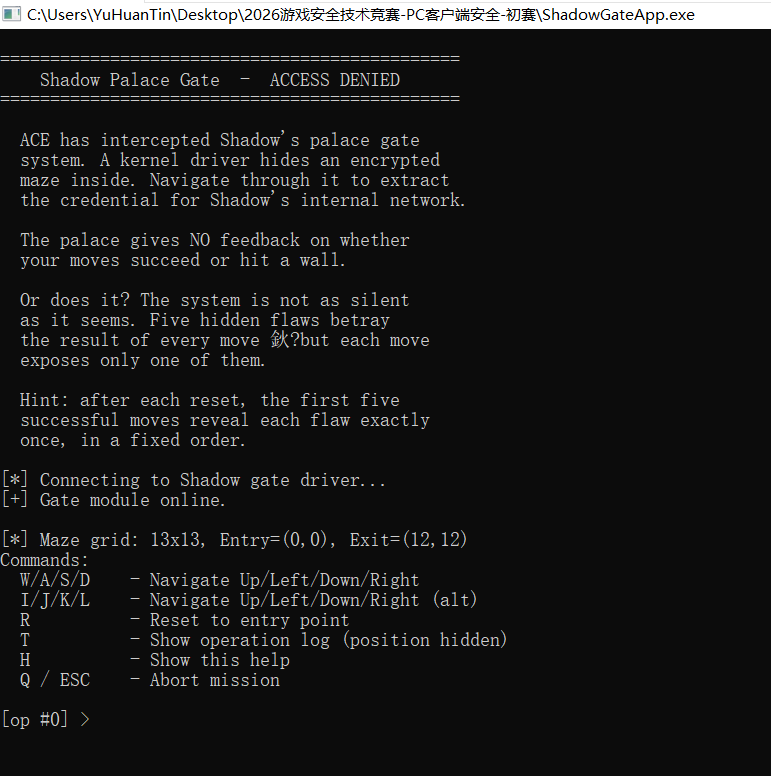
exe 分析
1 | |
重点在驱动交互,其余均为负责输入的逻辑
IO_8001200C
初始化
1 | |
1 | |
IO_80012004
1 | |
负责移动,发送给驱动的数据结构见下
1 | |
1 | |
IO_80012008_Reset
重置迷宫
1 | |
sys 分析
有一些难以分析的 call,nop 掉看整体流程
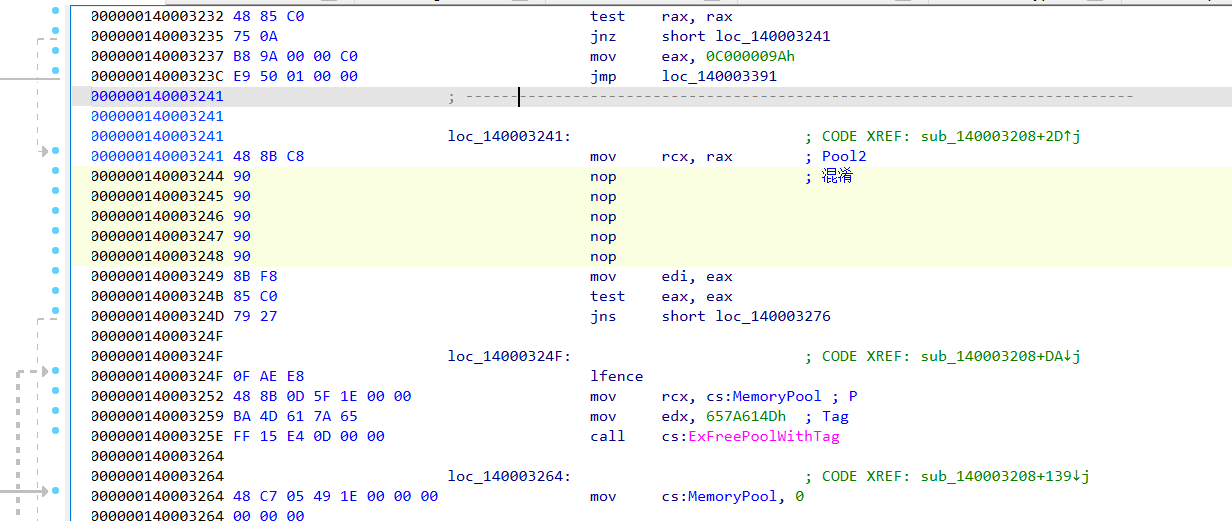
载入点
1 | |
Contorl 里面也有两处难以分析 call,nop 掉看整体逻辑
1 | |
CODE 0x8001200C
传递迷宫大小,位置信息
CODE 0x80012008
重置
CODE 0x80012004
移动,主要逻辑
移动延迟
KeDelayExecutionThread 对每步移动都进行一点延迟,所以算法爆破特别慢,需要 patch
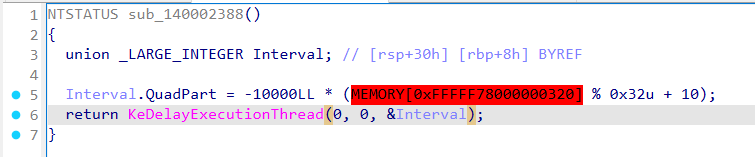
VA 0x1400026BD,RVA 0x26BD 全 nop (5字节)
1 | |
五个泄漏点
sys data 段起始有一个花指令魔数,通过该魔数可以定位四个泄漏点
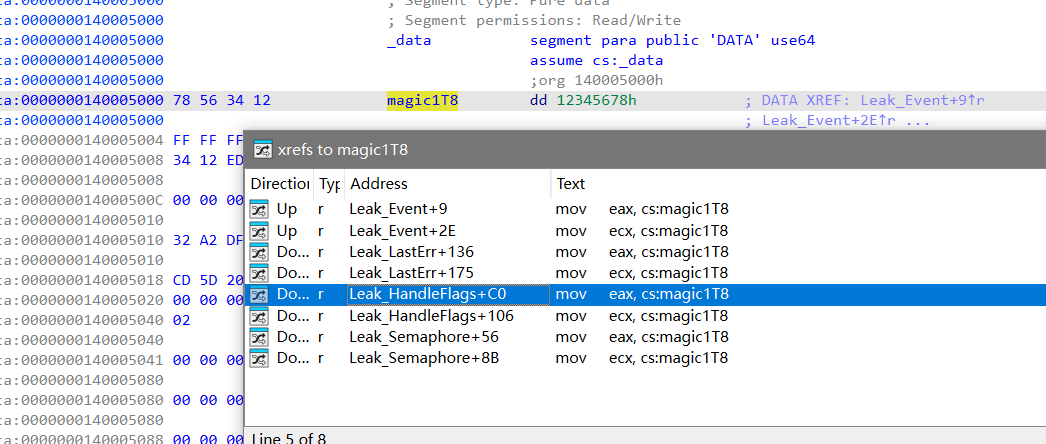
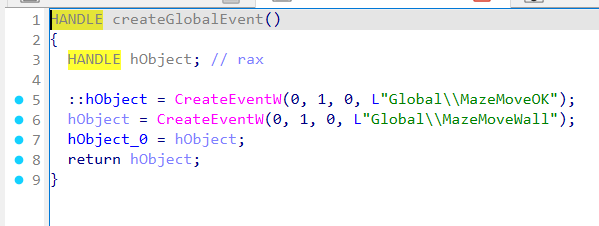
1. Event 泄漏
exe 0x140001340 创建 Global Event
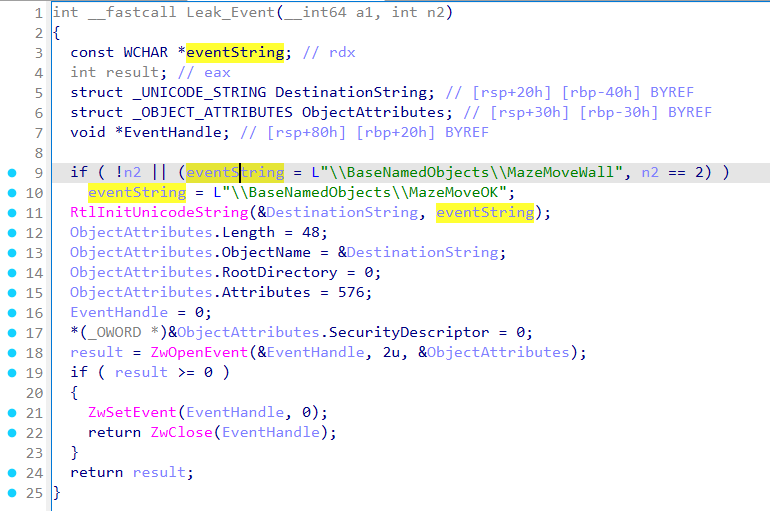
sys 0x1400022B0 中 event 泄漏:n2==0/2 置 MazeMoveOK,否则置 MazeMoveWall
2. 信号量 泄漏
exe 0x14021B91F 创建信号量,异或 0x4B 解密字符串
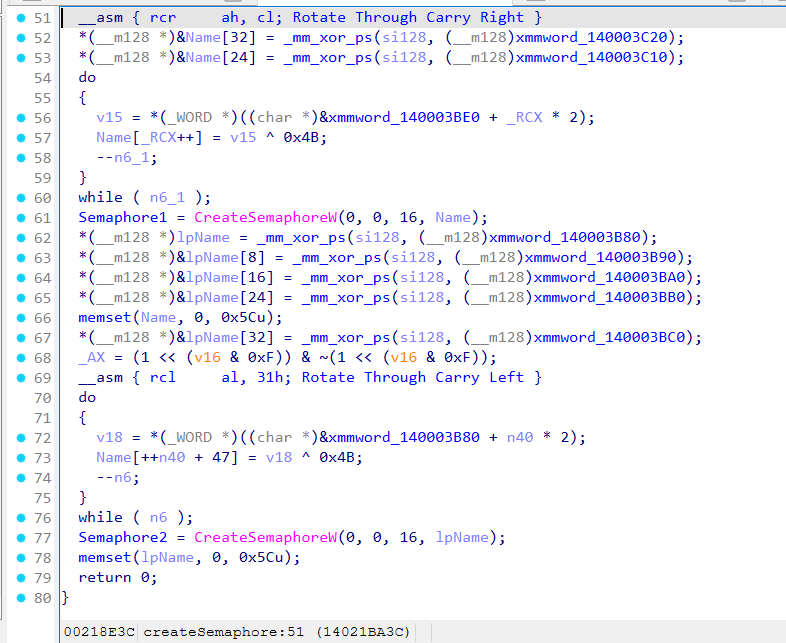
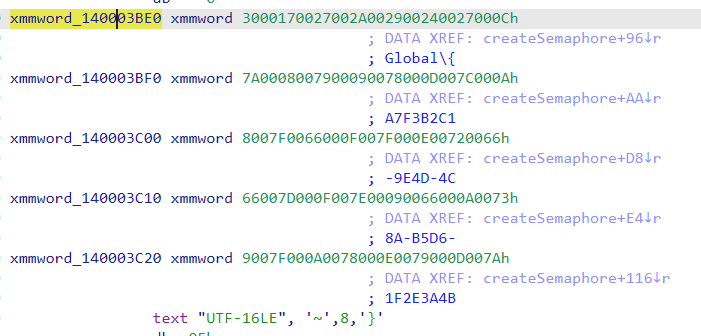
得到
1 | |
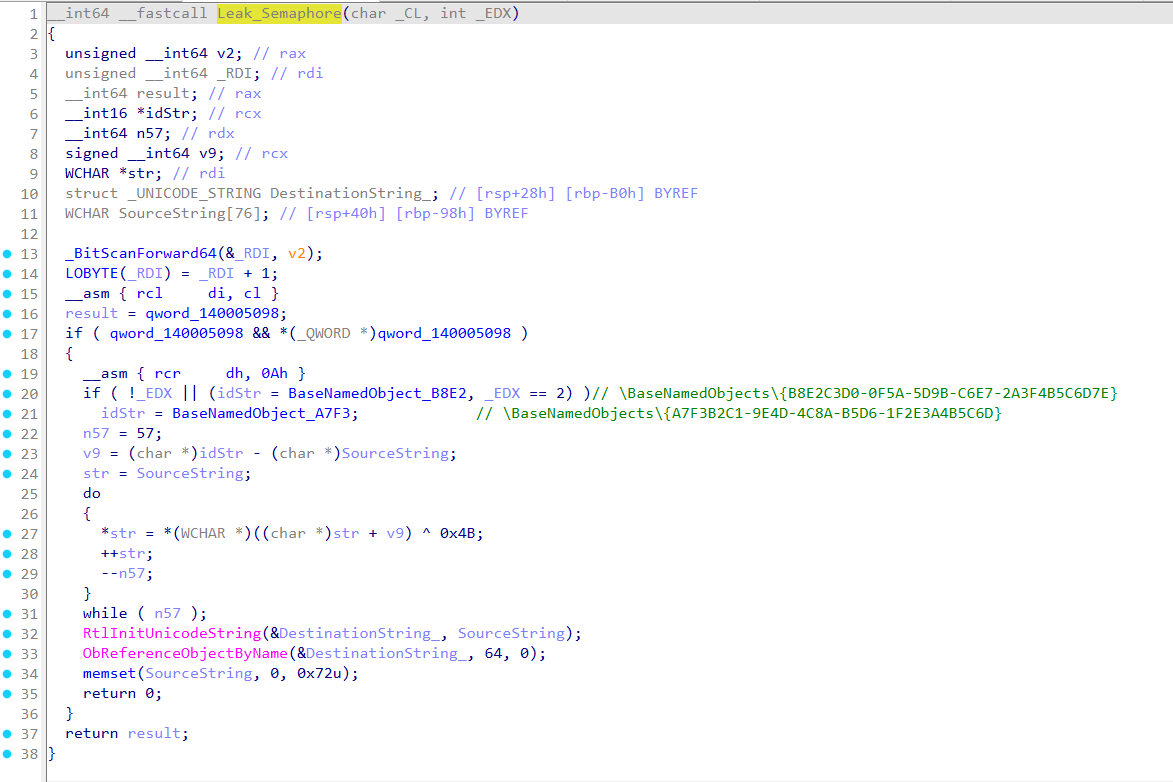
sys 0x140319A37 中 semaphore 泄漏,_EDX ==0/2 释放 {A7F3B2C1-9E4D-4C8A-B5D6-1F2E3A4B5C6D} ,否则释放 {B8E2C3D0-0F5A-5D9B-C6E7-2A3F4B5C6D7E}
3. TEB.LastError 泄漏
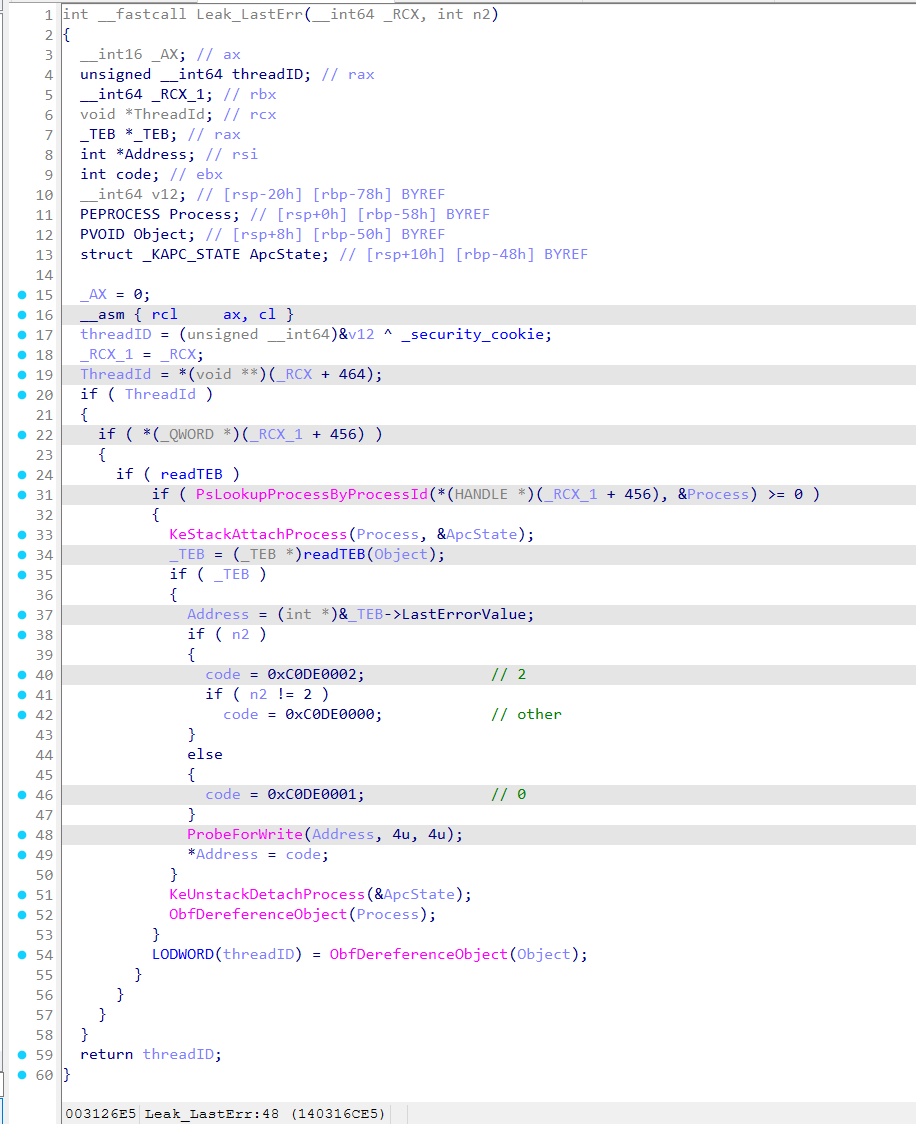
sys 0x140316ADF 中修改 exe LastErrorValue ,n2 为 0 时设置 0xC0DE0001, 2 时设置 0xC0DE0002, 其他时设置 0xC0DE0000
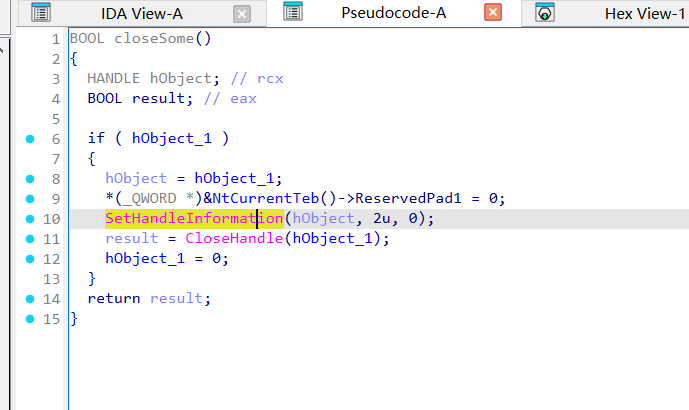
4. TEB + 0x1748 泄漏
exe 0x14021BC88 在释放时有部分提示
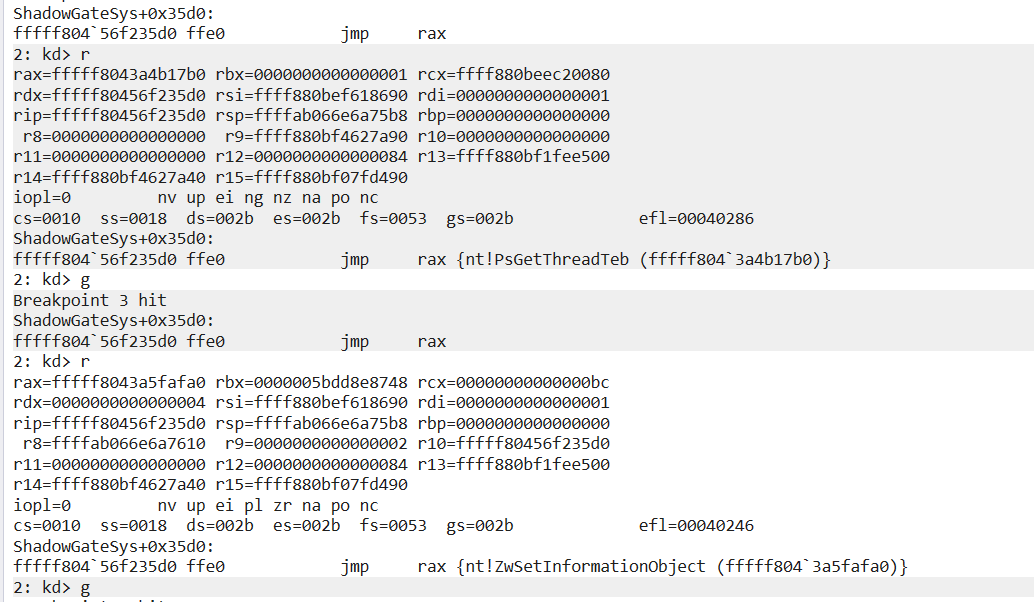
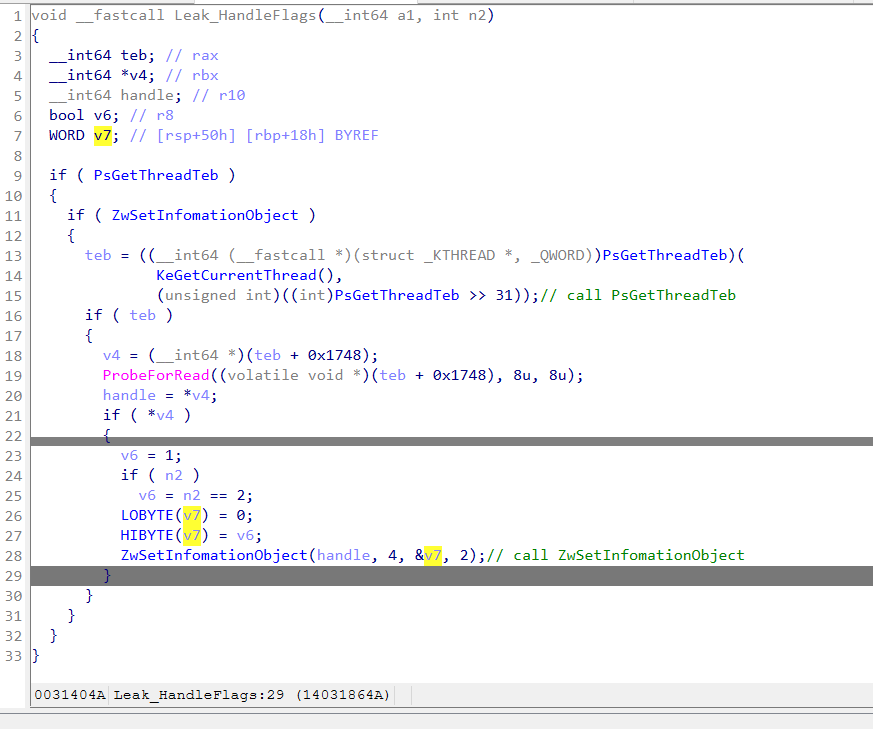
sys 0x14031857E 中,使用 PsGetThreadTeb 获取 TEB 后使用 ZwSetInfomationObject 对 teb + 0x1748 处进行设置
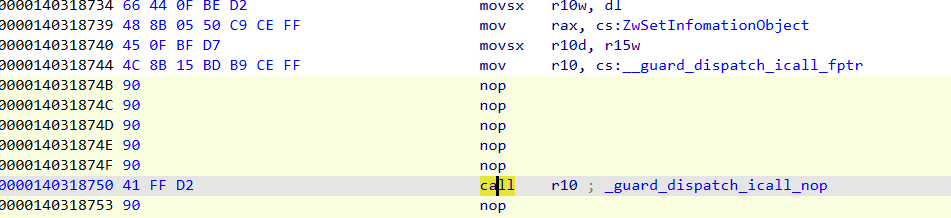
在 icall 分发处能够看到实际调用的 call 为 PsGetThreadTeb 和 ZwSetInfomationObject
两个 icall 都清理为 call rax 不然反编译有问题
n2 = 0/2,设置 1,否则设置 0
5. 内存属性 泄漏
在 _guard_dispatch_icall_nop 下断点,当输入断在 rax=ZwProtectVirtualMemory 时就是触发第五个漏洞
调用参数为
rdx = ShadowGateApp.exe 的 .data 页
rcx = ShadowGateApp.exe 的 .data 页长度
将 .data 页的属性修改为 RW 或 ERW
1 | |
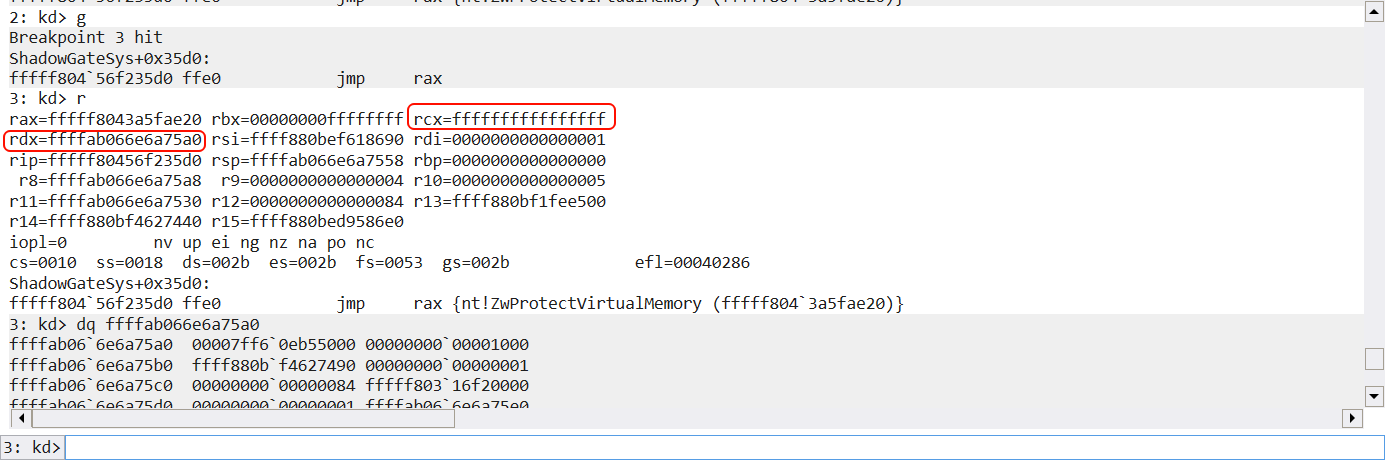
找了下没找到,看堆栈这个是真的在 vm 里面了,该泄漏通过观察页得到,猜测 sys 会修改名为 .data 的页


根据上面规则猜测 n2 = 0/2 时,页属性变成 PAGE_EXECUTE_READWRITE 其他时,保持 PAGE_READWRITE
查询迷宫 & 探索迷宫
方法一:r3 下通过泄漏探索迷宫
伪代码,完整见附件
1 | |
得到以下迷宫图
1 | |
方法二:可以通过 sys 直接读取分配内存读取到迷宫
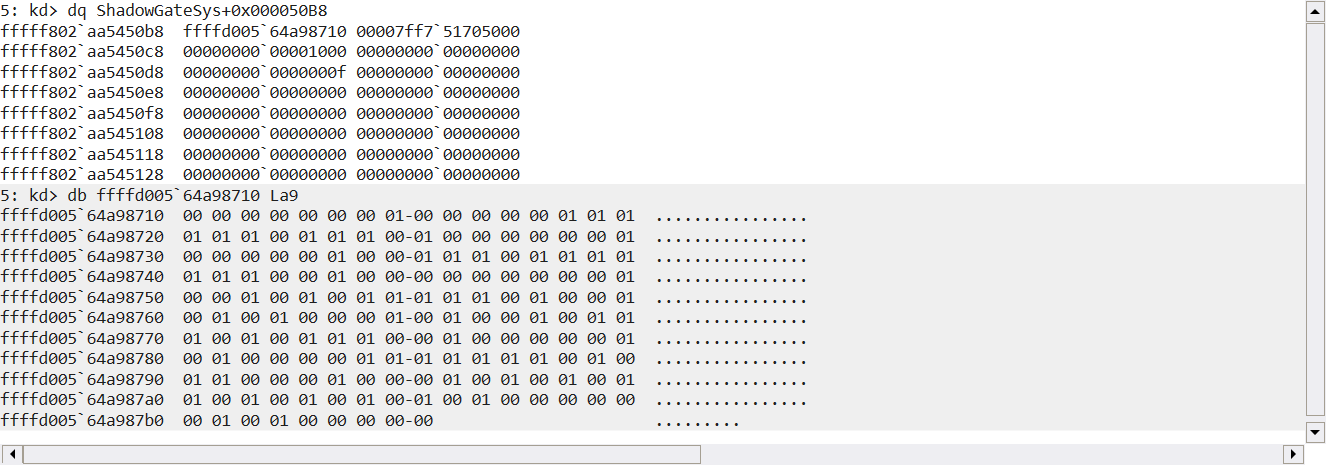
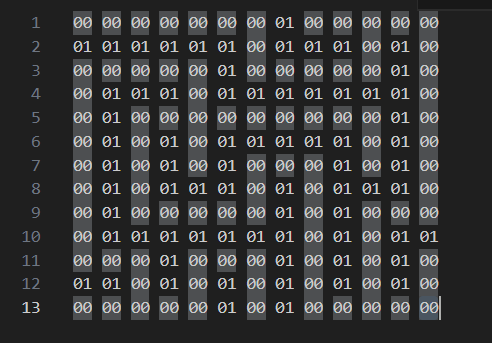
最短路径求解
bfs
1 | |
Flag
flag{SHAD0WNT_HYPERVMX}
1 | |
内网 ss 服务端搭建
在某某内网环境下,手机需要通过某内网设备来连接到互联网(内网设备已连接外网),且为了安全考虑,所以采用 ss 的加密,故有此篇记录
下载&启动 ss 服务端
选取 https://github.com/shadowsocks/shadowsocks-rust
笔者使用 shadowsocks-v1.24.0.x86_64-pc-windows-gnu.zip 进行测试
1 | |
生成密钥
1 | |
编写 config.json
1 | |
启动服务端(这里不做服务安装,仅作为 cli server)
1 | |
导出 ss 链接
1 | |
注意
由于服务端接收 0.0.0.0 也就是所有 ip 请求,所以生成的 ss 链接也是 0.0.0.0 所以需要改成目标设备 ip,例如 192.168.1.2@8388
注意最后要开启对应端口的防火墙,例如 8388
1+13T Root 记录
1+13T 刷机记录
目标:SukiSU-Ultra
准备
https://yun.daxiaamu.com/OnePlus_Roms/一加OnePlus 13T/
新机搭载 ColorOS PKX110_15.0.2.602(CN01) ,上面没有
1 | |
https://optool.daxiaamu.com/install_adb_drivers?src=pctool 下载并安装 fastboot 驱动
解锁BL
开发者 → OEM 解锁 开启
1 | |
1 | |
1 | |
1 | |
按音量下键并确认,出现黄字即成功
Root
本来想要采用 DSU + GSI Sideload 的方式启动下载本机的 init_boot.img 的,但是没找到编译好的,要不就是版本不对,所以不采用 DSU + GSI Sideload 的方式
更新系统到 603
https://yun.daxiaamu.com/OnePlus_Roms/一加OnePlus 13T/ColorOS PKX110_15.0.2.603(CN01) A.54/
系统 → 软件更新 → 本地更新,使用全量包安装
提取 img
https://yun.daxiaamu.com/files/tool/Fastboot Enhance/
加载全量包的 payload.bin 使用工具提取 init_boot.img 和 boot.img
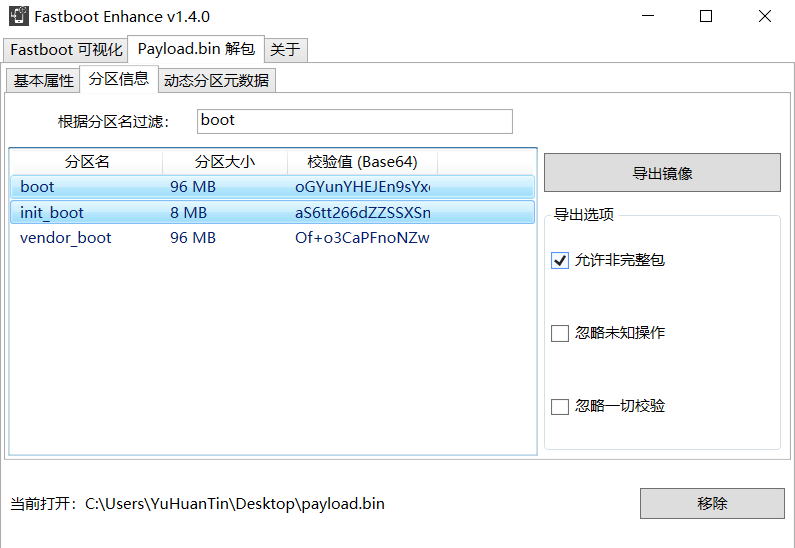
刷入 img
首先安装 SukiSu.apk,将刚才提取的 init_boot.img 进行修补,下载修补完成的 img
eg. kernelsu_patched_20241231_195134.img
进入 bootloader
1 | |
注意这是持久化刷入
1 | |
1 | |
刷入 TWRP(可不刷)
https://yun.daxiaamu.com/files/TWRP/OnePlus 13T/kmiit/
1 | |
fastboot 下
1 | |
slot-count: 如果显示 2,说明是 A/B 分区;如果显示 1 或找不到,则是传统的 A-only 分区
current-slot: 显示当前活跃的分区(如 a 或 b)
has-slot:recovery: 如果显示 yes,说明你有独立的 recovery 分区;如果显示 no,说明你的 Recovery 是集成在 boot 分区(或 Android 13+ 的 init_boot / vendor_boot)里的
1 | |
在拥有全量包的情况下其实无需安装 TWRP,如果出现故障,fastboot boot 到 TWRP 临时用即可
备份
字库备份
吐槽:这是哪个大聪明发明的词,就是备份分区 :(
使用多系统工具箱 / TWRP 直接备份均可,super 可不用备份
保留 root 升级
见视频
不可禁用/删除 app
| 名称 | 解决方案 | |
|---|---|---|
| 软件包安装程序 | CrossProfileTestApp.apk 禁用 or CtsPermissionApp(未测试) |
需要删除的
com.coloros.phonemanager
com.oplus.appdetail
基本模块
ref
https://github.com/eritpchy/FingerprintPay/releases(指纹)
https://www.bilibili.com/video/av115547337459255(晨钟酱)
https://www.bilibili.com/video/av115042041206760
https://www.bilibili.com/video/av616455200/ or https://www.bilibili.com/video/av616455200/(CrossProfileTestApp)